

Enhance Collaboration with Logitech Devices
Founded in 1981, Logitech has become a trusted leader in enterprise collaboration technology, developing solutions designed to support the evolving needs of modern workplaces. Its extensive portfolio of video conferencing devices combines elegant design with intuitive functionality to deliver reliable, user-friendly experiences across every room type. From small collaboration spaces to large, multi-purpose environments, Logitech focuses on creating solutions that feels consistent and simple for users, while remaining flexible enough to adapt as workplace requirements change.
By offering native support for Microsoft Teams, Zoom and Google Meet, alongside flexible BYOD capabilities, Logitech ensures organisations can standardise their meeting experiences with confidence. Its solutions are built with hybrid working in mind, helping teams connect seamlessly whether participants are in the room or joining remotely. With a strong focus on usability, design and interoperability, Logitech enables organisations to create inclusive meeting environments that encourage engagement and productivity.
As a certified partner, Cinos have extensive experience in delivering Logitech into a range of professional environments. This includes a large-scale rollout of Logitech Teams Rooms for a leading SaaS provider, as well as ongoing work with the Government Property Agency, where Logitech BYOD solutions have been deployed in more than 600 meeting rooms.
If you are considering Logitech solutions for your meeting spaces, please do get in touch. Our expert team are on hand and ready to discuss your requirements.
Logitech Meeting Room Devices
Flexible Solutions
for Any Workspace
Logitech solutions deliver exceptional collaboration experiences across every workspace. From the Rally family, featuring powerful all-in-one video bars and interactive boards with flexible mounting options, to the cost-effective MeetUp range designed for smaller rooms, Logitech ensures seamless collaboration in spaces of any size. Native support for Microsoft Teams, Zoom and Google Meet ensures a consistent user experience across your estate, with BYOD support providing added flexibility when needed.
Intuitive control and room management further enhance the experience. The Logitech Tap touch controller enables one-touch join, simple content sharing and seamless calendar integration, while the Logitech Tap Scheduler displays room availability and enables effortless booking at the door. Together, these solutions create meeting environments that are simple to use, easy to manage and built to support productive collaboration.
Related Pages


Hybrid Collaboration
& Workspace Intelligence
Enhanced hybrid collaboration is central to Logitech’s meeting room innovation. In larger spaces, Rally Mic Pods extend clear, consistent audio throughout the room, while Logitech Sight uses intelligent multi-camera views to give remote attendees the best possible view of speakers. Logitech Scribe, an AI-powered whiteboard camera, further enriches collaboration by seamlessly sharing whiteboard content into video meetings. Combined with AI-driven noise suppression and auto-framing, Logitech ensure truly equitable meeting experiences where everyone can see, hear and contribute with ease.
For IT teams, Logitech Sync provides centralised management of collaboration estates, simplifying remote configuration, monitoring and device updates, while Logitech Spot sensors provide valuable insights into occupancy and environmental conditions. Together, these solutions provide the intelligence for organisations optimise space usage, maintain performance and support smarter workplace decisions.
Cinos and Logitech
Featured Updates
- Projects – In FocusNovember 26, 2025
In 2022 the Government Property Agency (GPA) published the Government Workplace Design Guide – a strategic framework for creating workplaces that enable a modern, inclusive and effective civil service. The guide outlines the baseline standards for all central government office buildings, [...]
In 2022 the Government Property Agency (GPA) published the Government Workplace Design Guide – a strategic framework for creating workplaces that enable a modern, inclusive and effective civil service. The guide outlines the baseline standards for all central government office buildings, [...]

 Projects – In FocusFebruary 27, 2025
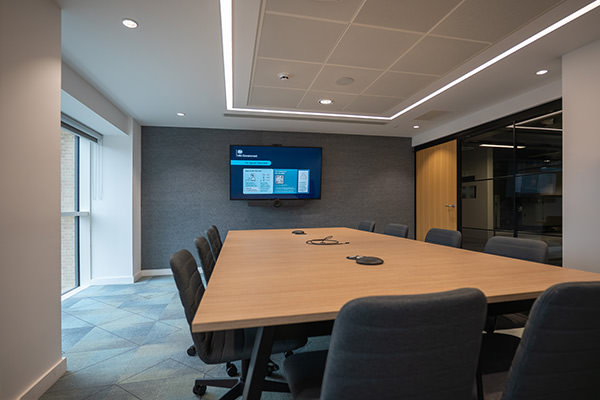
Our client is a leading name in business management SaaS solutions. Its operations span multiple locations, supporting millions of small and medium size businesses globally. With a significant UK presence, the client wanted to ensure a consistent and efficient meeting experience [...]
Our client is a leading name in business management SaaS solutions. Its operations span multiple locations, supporting millions of small and medium size businesses globally. With a significant UK presence, the client wanted to ensure a consistent and efficient meeting experience [...]

- In The NewsFebruary 17, 2026
Integrated Systems Europe (ISE) 2026 brought the AV industry together once again at Fira de Barcelona Gran Via and it proved to be another landmark year for the show. Cinos was well represented at the show, with 20 people from multiple [...]
Integrated Systems Europe (ISE) 2026 brought the AV industry together once again at Fira de Barcelona Gran Via and it proved to be another landmark year for the show. Cinos was well represented at the show, with 20 people from multiple [...]



Logitech Video Conferncing
Frequently Asked Questions
Before carrying out a Logitech installation for Teams Rooms, Cinos will work with you to understand your specific requirements. This will involve understanding the number of meeting spaces you are looking to equip, assessing the room sizes and acoustics and any special requirements you have such as divisible or multipurpose meeting spaces.
Our experts then design a tailored Microsoft Teams Rooms setup, integrating the right Logitech devices, display solutions, audio systems, and control elements for your spaces. Every stage of the installation is managed by Cinos, from configuration and testing through to full integration with your Microsoft Teams platform and wider IT network, with a strong focus on creating an intuitive, user-friendly experience for all attendees.
Logitech Tap provides intuitive, in-room control for Microsoft Teams Rooms, delivering one-touch join, calendar integration, and instant content sharing. Its 10.1” touchscreen and sleek, low-profile design offer a consistent, user-friendly experience across rooms of all sizes.
Tap is always ready thanks to its built-in motion sensor, powering on automatically when someone approaches. Wired or wireless content sharing is simple, and the system supports a range of accessories such as USB speakerphones with its USB accessory port. Clean cable management and anti-theft features ensure a tidy, secure setup.
With Tap, meetings start effortlessly, and participants can focus on collaboration rather than technology, helping every Teams Rooms experience run smoothly.
Yes. Logitech Tap Scheduler is a purpose-built room scheduling panel that makes it easy to view meeting details and reserve spaces for ad hoc or future meetings.
The panel integrates with Google Calendar and Office 365, allowing employees to book rooms directly from their meeting invites with no extra steps. LED indicators show room availability at a glance, while mounts and clean cabling provide a professional, tidy setup.
For rooms equipped with Rally Bars, in-camera sensors can automatically detect meetings and update the Tap Scheduler status; marking the room as occupied when in use and releasing it when the meeting ends.
The Logitech Scribe is an AI-powered whiteboard camera that brings your whiteboard content directly into video meetings. Compatible with Microsoft Teams Rooms and other leading platforms, Scribe ensures that every participant, in-room or remote, can follow along with clarity.
Its custom lens and AI technology deliver perfect views of the whiteboard, while presenter removal creates a transparency effect so the presenter doesn’t block content. Scribe also automatically enhances the colour and contrast of dry erase markers, making text and sketches easier to read for all attendees.
With Logitech Scribe, organisations can make whiteboard collaboration seamless, engaging, and inclusive for hybrid teams.
Yes. Logitech Sync is the cloud-based management platform designed to simplify and scale the administration of meeting room and personal collaboration devices.
With Logitech Sync, IT teams can remotely monitor, configure, and update devices across their organisation, whether they’re deployed in offices, meeting rooms, or at home. This ensures devices remain optimised, secure, and running the latest firmware at all times.
Sync also helps reduce downtime through automated alerts and integrations, such as with ServiceNow, enabling teams to act quickly when issues arise. Administrators can view devices in real time, identify rooms or peripherals that need attention, and troubleshoot remotely to keep meetings running smoothly.
Integration with Logi Tune extends this capability to personal devices, including webcams, headsets, and Logi Dock stations; ensuring consistent performance and a connected experience for all users, wherever they work.
Absolutely. Cinos provides comprehensive support and maintenance for Logitech Microsoft Teams Rooms to ensure your meeting spaces remain reliable, secure, and fully functional. We design a maintenance plan tailored to your organisation’s requirements, whether that involves a single room or an entire estate.
With Cinos managing your Logitech Microsoft Teams Rooms, you can be confident that your technology will perform at its best, supporting productive, uninterrupted collaboration for all users.
Yes. Logitech’s Microsoft Teams Rooms portfolio is designed to deliver exceptional meeting experiences across every space, from compact huddle rooms to large-scale conference areas.
The Rally family offers scalable, high-performance video solutions to suit every environment. Rally Bar Mini is ideal for medium rooms, while Rally Bar extends this capability to larger spaces. For extra-large rooms, Rally Plus combines modular components, including Rally Mic Pods with RightSound technology, to ensure clear, balanced audio throughout the room. For smaller areas, MeetUp and MeetUp 2 provide cost-effective all-in-one options designed for huddle and small rooms.
Alternatively, the Rally Board 65 brings flexibility to any meeting space. With multiple mounting options, including a mobile cart, it can be positioned wherever collaboration is needed.
To support equitable meetings in larger spaces, Logitech Sight, a tabletop companion camera, uses intelligent multi-participant framing to deliver the best front-and-centre view of every attendee. Together, these solutions ensure a consistent, high-quality Microsoft Teams experience, no matter the size or layout of the room.
Yes. Microsoft Teams Rooms require specific licences to function, separate from standard Microsoft 365 or Teams subscriptions. At a minimum, each Teams Room needs a Microsoft Teams Rooms Standard or Premium license, which provides the software and cloud services required to schedule, join, and manage meetings from a Teams Room.
Cinos can help you identify the correct licensing based on the number of rooms, types of spaces, and the features you require. We can also advise on add-ons or upgrades, such as advanced management and analytics.


